
AI Tools to Enhance Photos Before Printing: 2026 Edition
Why Photo Enhancement Matters Before Printing
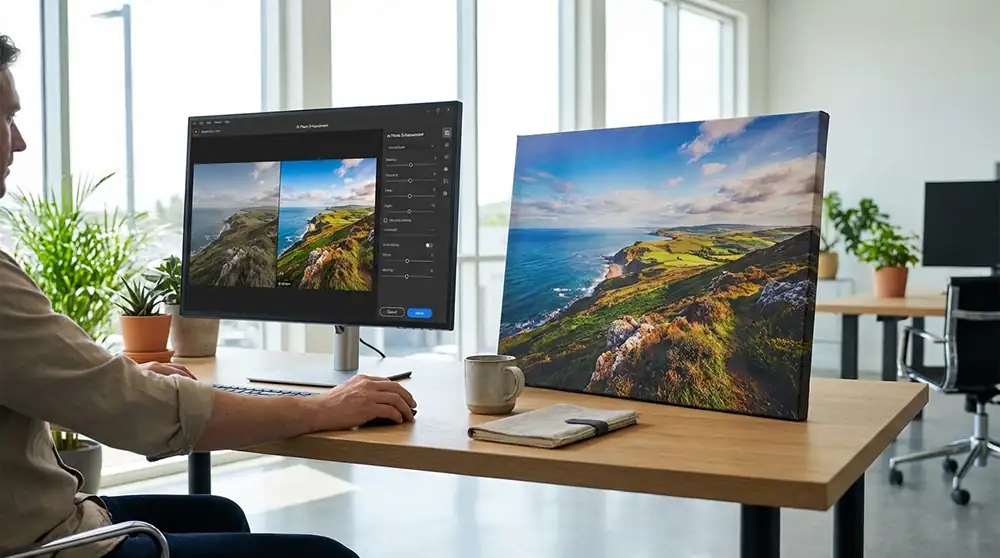
AI photo enhancement helps fix that by raising resolution and smoothing out imperfections automatically. It’s like giving your photo a quick professional touch before sending it to print.
According to Mordor Intelligence, the global photo printing market reached $27.76 billion in 2026 and keeps growing. That rise means people want sharper, cleaner prints and smarter editing tools to go with them. These days, most users expect results that look polished, not just okay.
Artificial intelligence is revolutionizing the photo printing industry by automating defect correction, color toning, and resolution improvement, leading to higher quality prints.
AI is good at spotting what makes a photo feel natural and alive. Deep learning systems notice tiny changes in texture, lighting, and tone, then rebuild missing details so the printed image looks true to the original.
Modern tools can even tell the difference between real film grain and digital noise, keeping textures believable and close to how the moment looked.
This mix of clarity and authenticity connects digital photography with the lasting beauty of printed art, reminding us why physical prints still matter.
| Metric | Value | Source |
|---|---|---|
| AI Photo Editors Market Size (2024) | $2.1 billion | Emergen Research |
| Projected Market Size (2034) | $8.9 billion (15.7% CAGR) | Emergen Research |
| AI visual inspection accuracy for print defects | 99.9% | WifiTalents |
| Typical AI-enhanced image resolution for print | 300+ DPI | Custom Print House |
AI-upgraded photos often reach resolutions above 300 DPI, perfect for sharp, rich prints.
That helps especially with large pieces like posters, canvas art, or gallery work. As printing technology keeps improving, many studios now include AI enhancement before printing, it makes sure every image stays clear, colors look balanced, and the final result feels truly professional.
Get Print-Ready Results Effortlessly
How AI Tools Improve Photo Quality for Printing
AI photo enhancers use deep-learning models trained on millions of pictures to guess, rebuild, and restore missing details with impressive realism.
This process, called generative upscaling, doesn’t just enlarge pixels; it reinterprets them so each image feels renewed with extra depth and clarity, almost like giving an old photo a fresh start.
Experts from Future Market Insights say that new progress in machine learning and computer vision has made editing tools much more accurate.
They’re also getting faster each year, which helps when someone has lots of prints waiting to be processed.
Advances in artificial intelligence, machine learning, and computer vision technologies have enabled platforms to perform complex image enhancement, retouching, and manipulation tasks with high precision and efficiency.
Thanks to these upgrades, faded or blurry shots can often look completely restored, motion blur becomes crisp, highlights soften, and uneven tones even out with minimal editing.
Tools such as Topaz Photo AI, Adobe’s Super Resolution, and WaveSpeedAI rebuild realistic textures while working smoothly with most printers. Because AI understands how light and shadow interact, it usually adjusts contrast and brightness so printed photos look rich and detailed, closely matching what you see on your screen.
AI has also changed how color calibration works. It converts RGB images into CMYK using smart tone mapping, keeping printed colors very close to the digital versions.
Many print shops now use AI-based calibration to maintain color accuracy across devices, saving plenty of ink and paper. Studies show reprints have dropped by about 40%, which proves how helpful this smarter tech can be.
Choosing the Right AI Photo Enhancement Tool
AI photo enhancers come in many forms, and it’s easy to feel lost with so many options. Some are great for reducing noise (perfect for grainy night shots), while others focus on upscaling, fixing old family photos, or sharpening small details like fabric texture or strands of hair.
The best pick usually depends on what you want to do and how big you plan to print, whether it’s a small postcard or a huge wall display.
Here’s a quick breakdown:
| Feature | Best For | Example Tool |
|---|---|---|
| Upscaling | Large prints and posters | LetsEnhance |
| Noise Reduction | Low-light photos | Topaz Photo AI |
| Color Correction | Accurate tones for CMYK printing | Adobe Super Resolution |
| Restoration | Old or damaged photos | WaveSpeedAI |
Generative upscaling tools often work best for large prints, reaching resolutions up to 16K or even 32K. Portraits need a softer touch, denoising and color correction help keep skin natural and lighting smooth.
Your workflow matters too. Cloud tools are great for group projects, while desktop apps tend to run faster for solo studio work. Knowing these differences can save time and make your final images look much sharper.
LetsEnhance.io says new generative models could soon let home printers produce crisp, oversized prints. That means anyone could make gallery-quality photos straight from a phone. As AI becomes part of everyday tech, printers and screens may soon improve photos automatically before you even press “print.”
Common Mistakes to Avoid When Using AI Enhancement
AI tools make photo editing wonderfully simple, but a few unnoticed habits can quietly hurt print quality if you’re not careful (and yes, that’s something learned the hard way).
- Over-sharpening, When edges are pushed too far, they often look stiff and overly polished instead of smooth and natural.
- Ignoring color profiles, Printing depends on correct CMYK calibration, not just what your screen shows in RGB, which usually differs more than you’d expect.
- Low DPI exports, Saving your final image at 300 DPI or higher keeps every detail clear when printed.
- Skipping manual review, Even smart AI tools miss small flaws, so taking a moment to check your work often makes the difference between “good” and “great.”
Modern AI “Pre-Flight” systems can now scan print files for color and resolution issues automatically.
WifiTalents says these tools prevent poor prints with about 98% accuracy, which is impressive. Still, automation can’t replace human judgment. Adjusting warmth or softening textures adds feeling that algorithms can’t predict. When AI precision works with an artist’s intuition, prints feel more personal, almost carrying the creator’s touch.
Ready to Apply These AI Techniques?
AI Trends Shaping Photo Printing in 2026
AI photo improvement is speeding up fast, changing not only how printed pictures look but how they’re made. Every few weeks, a new tool appears, and the process looks nothing like it did a year ago. The most interesting changes right now show how creativity and technology are coming together in new ways:
- Authentic Aesthetics: AI tools now prefer natural texture and soft tones instead of the shiny perfection people once wanted. This shift toward realism makes prints feel warmer and more handmade, almost as if someone carefully touched up every part (LTX Studio).
- Workflow Automation: Today’s printers use AI to check sharpness, color balance, and layout before printing. Production feels smooth since there’s no need for constant oversight.
- API-Based Enhancement: Platforms like WaveSpeedAI help photo labs handle large batches without losing clarity. Many professionals say it saves hours and eases stress near deadlines.
- Real-Time Correction: Visual AI now spots mistakes instantly, hitting around 99.9% accuracy for steady, professional results, an impressive jump by any measure.
Photo printing is no longer just mechanical; it reacts and often feels artistic. Smart printers adjust to style, paper type, and even room conditions like humidity or light. It’s also more eco-friendly, less wasted ink, faster results, sharper prints, and lower costs.
The AI product photography market grew from $450 million in 2024 and is projected to explode to $5 billion by 2035. That’s a staggering 24.5% compound annual growth rate.
Practical Steps to Improve Photos Before Printing
Ready to print your photos? Here’s a simple guide to help them look great on paper, because after all that editing, dull colors can be disappointing.
- Start with your clearest file. Screenshots or compressed versions often lose detail and end up blurry when printed.
- Try an AI photo tool that sharpens edges, cuts noise, and fixes lighting; it’s like watching a tired picture brighten up.
- Check your DPI. Around 300 or more keeps prints crisp, especially when someone looks closely.
- Switch to CMYK so colors come out right on paper; RGB tends to boost brightness too much.
- Do a soft proof preview, you’ll catch odd color changes before wasting paper or ink.
- Save as TIFF or high-quality JPEG, since those formats keep the texture nicely.
These steps help photos look lively. And seriously, calibrate your monitor first. Many people test small prints on different papers; those quick trials often reveal the best final result.
Start Printing Smarter Today
AI photo improvement isn’t just another tech trend; it’s already changing how printed pictures look and feel. Using deep-learning upscaling, automatic color balance, and smart detail recovery, these tools let anyone make print-ready photos that appear clear, natural, and full of character.
Whether it’s an experienced photographer refining landscapes or someone touching up family snapshots, AI usually helps photos look sharper, brighter, and closer to how the moment truly appeared.
The printing world has caught on quickly, and by around 2026, this smarter method will likely be common practice. As the tech keeps growing, you can expect tools that suggest gentle adjustments, like softening shadows or brightening highlights, right before printing.
Letting AI manage the technical parts gives you more room for creative decisions. A mix of smart automation and careful printing can turn an ordinary photo into one you’d happily hang on your wall.
With thoughtful AI design and skilled craftsmanship together, photos often turn into true works of art.